
Text messages to PDF, with a time on every message
Text Exporter will turn a Messages or WhatsApp chat into a paginated PDF on your iPhone, with the sender and time on every message. You can try the same PDF free with a WhatsApp chat today.
Short answer
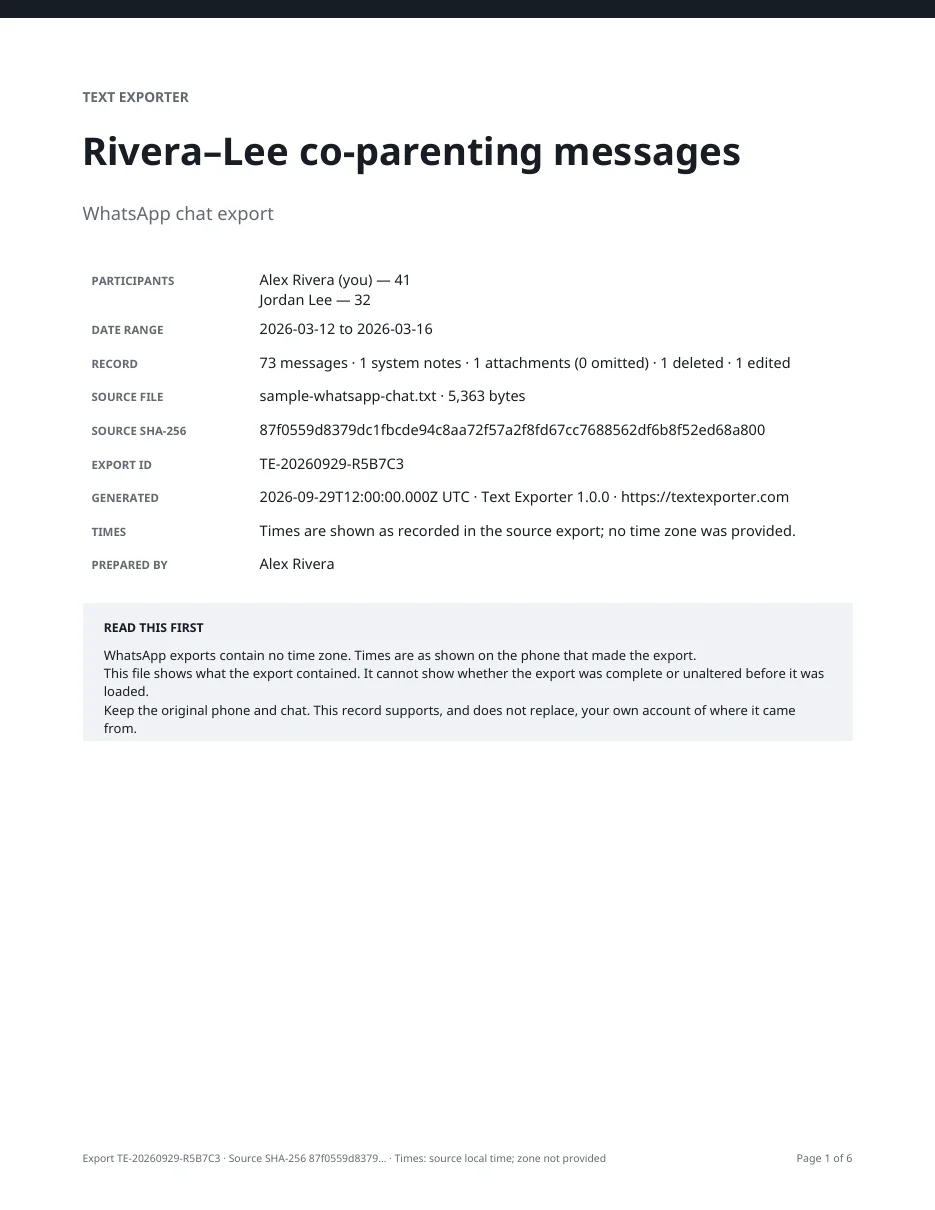
Without an app, turning iPhone texts into a PDF needs a Mac (File › Print › Save as PDF). Text Exporter will do it on the phone. Pick a chat, confirm who is who, and export a PDF with a cover page, a sender and time on each message, page numbers and a checksum of the source. WhatsApp chats convert free in your browser now.
Every message page, explained
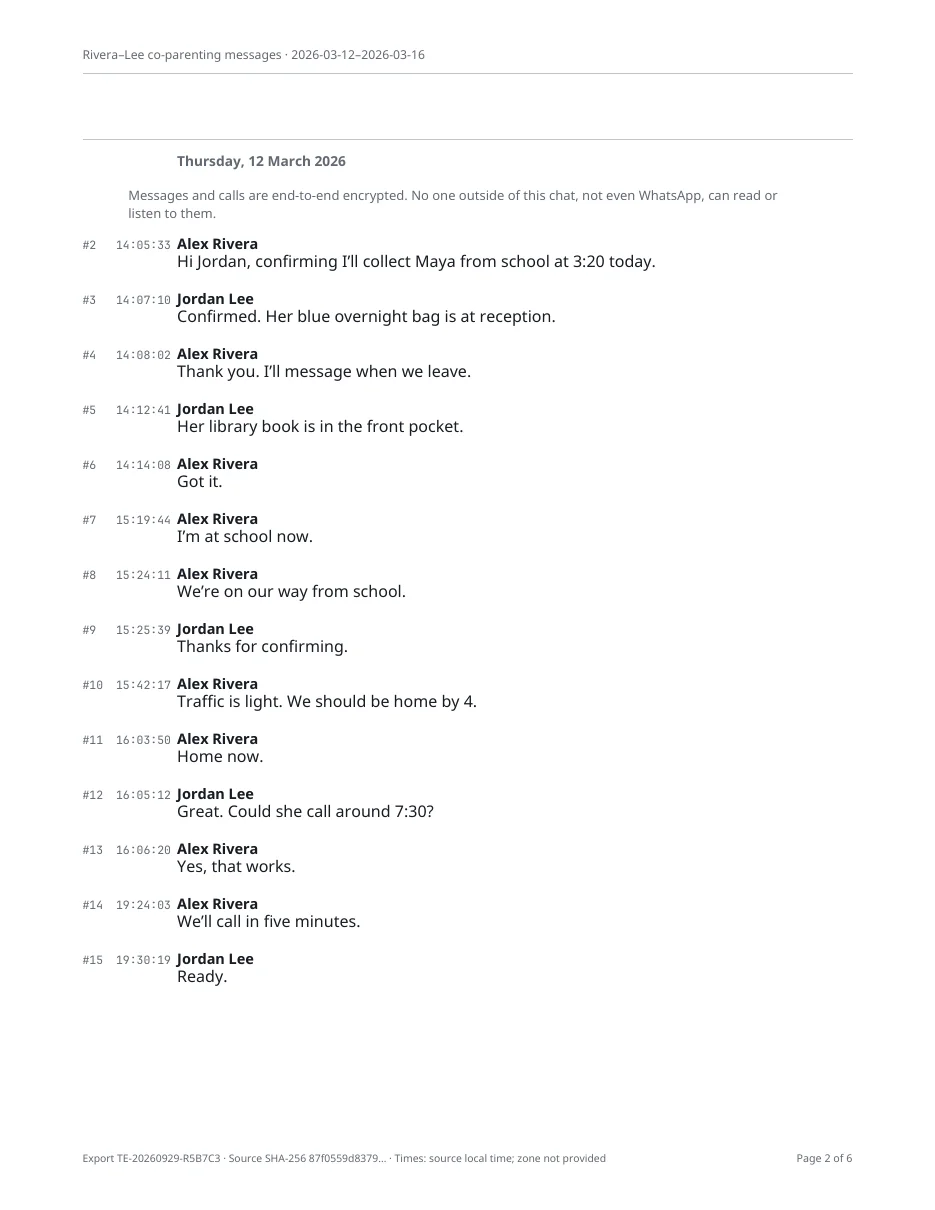
This is a real page from a sample WhatsApp chat, made by the same transcript layout the app uses.
- Running header
The chat title and its first and last dates repeat on every page, so a loose page still says where it came from.
- Date header
A new header starts each day, in words, so nobody has to decode 03/04 versus 04/03.
- Message number
#2,#3and so on are positions in the original export. A gap in the numbers means a message was left out of an excerpt. - Time
To the second when the source records seconds,
~14:05when a time is approximate, andno timewhen the source has none. Nothing is filled in. - Sender
The name exactly as the export wrote it. You confirm which participant is you before exporting.
- Footer
The export ID, the first characters of the source file's SHA-256 checksum, the time zone note and Page 2 of 6.
The cover page says what the record is, and what it is not
- Participants and counts
Each person with the number of messages they sent.
- What is in the record
Messages, system notes, attachments, omitted media, deleted and edited messages, counted.
- Source file and checksum
The file name, its size and its full SHA-256 checksum. Anyone can recompute it with the free verifier.
- Read this first
Plain notes on what the source does not record, such as WhatsApp's missing time zone, and a reminder to keep the original phone.
Five files from one export
The PDF is for reading and printing. The other files are for checking, searching and keeping.
| File | What it is for | What is in it |
|---|---|---|
| PDF transcript | Reading, printing, sharing with a lawyer | Cover page, every message with sender and time, page numbers |
| CSV spreadsheet | Sorting and filtering in Excel, Numbers or Sheets | One row per message with date and time, time precision, sender, text, attachments, edits, replies and reactions |
| Plain text | Pasting into a document or email | The same transcript without layout |
| JSON data | Keeping a complete machine-readable copy | Every field Text Exporter read, including edits, replies and reactions |
| Manifest | Showing later that files were not changed | SHA-256 checksums of the source and every exported file |
Ways to turn texts into a PDF
| Method | Works on the iPhone alone | Time on every message | Cost |
|---|---|---|---|
| Messages on a Mac, Save as PDF | ✕Needs a Mac | ◐Time markers between messages | Free with a Mac |
| Screenshots combined into a PDF | ✓ | ◐Only times visible on screen | Free |
| Free WhatsApp to PDF tool | ✓In the browser | ✓As recorded in the export | Free |
| Text Exporter for iPhoneOurs | ✓ | ◐As the source supplies it | Free to import, review and make a preview export; prices shown before you start |
Text Exporter is not released yet. Its row describes what it is being built to do. The free WhatsApp tool works today.
Sources: support.apple.com
How many pages will your chat be?
The PDF fits more on a page than screenshots because it drops the bubbles and keeps one line of sender and time per message.
Measured on October 1, 2026 by rendering test chats with our transcript layout: about 16.4 short, 11.5 medium or 8.7 long messages per Letter page. Photos and very long messages add pages.
What the PDF cannot do
- It shows what the source contained. It cannot show whether the source was complete or unaltered before it was loaded.
- It cannot add a time, a phone number or an attachment the source did not include.
- A checksum shows a file has not changed since export. It does not prove who sent a message. Courts decide what evidence is admissible.
Text Exporter is coming to iPhone
It will import chats from Messages, WhatsApp, Instagram, Messenger, Telegram and LINE on your iPhone and export a timestamped PDF, CSV and TXT, without uploading anything.
- Sender, date and time on every message
- Processed on the device, nothing uploaded
- Free to import, review and preview; prices shown before you start
Questions people ask
Can I convert text messages to PDF for free?
Yes, with a Mac (File › Print › Save as PDF) or screenshots. WhatsApp chats convert free with our WhatsApp to PDF tool, which runs in your browser.
Will I be able to edit messages before exporting?
No. Imported messages stay exactly as they arrived. You can set display names, redact text and add notes; these sit in a separate layer, and the PDF lists them.
Are my messages uploaded anywhere?
No. Text Exporter will process chats on the iPhone. Files leave the phone only when you share them.
What paper sizes are supported?
US Letter and A4.
Which chats will it work with?
Messages (iMessage and SMS) through an iOS 26 Shortcut, plus the exports WhatsApp, Instagram, Messenger, Telegram and LINE make. Apps with no export, such as Signal and Snapchat, are not supported. See which chats import.
Related
Sources
Checked on October 1, 2026. Platforms and rules change; if something is out of date, email hello@textexporter.com.